Guide · Soldering stations and irons
Pinecil vs TS101
Power, inputs, tips and heat-up for the Pinecil V2 and TS101, why Pine64 says no AliExpress Pinecil is genuine, and the Amazon listing Pine64 links.
We may earn a commission if you buy through links on this page. How we make money
Picks that fit
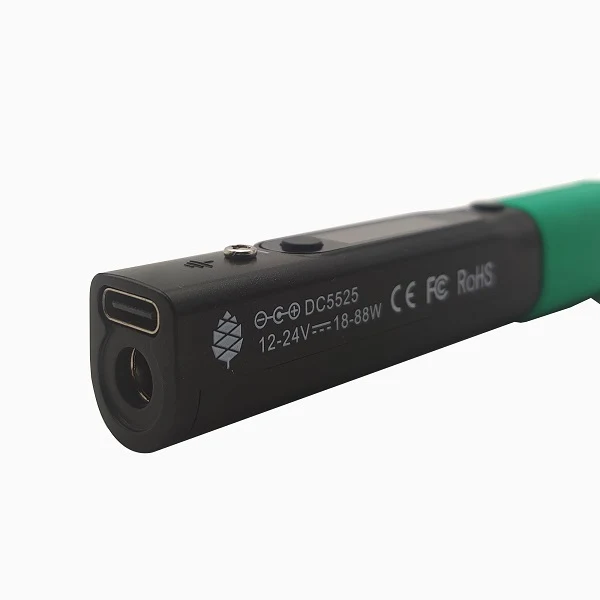 PINE64 Pinecil V2 USB-C smart soldering ironImage: PINE64Check price on Amazon
Short answer
On paper, the Pinecil V2 has more power, up to 88 W at 24 V,[1] while the TS101 is rated up to 45 W on USB-C and 65 W on a DC supply.[2] Both take TS100-style tips. Our pick is the Pinecil V2, bought through the Amazon US listing that Pine64's own Where-to-buy page links. Pine64 says that listing has the iron with "no tips/accessories",[3] so you also need a USB-C PD charger. Do not buy a Pinecil on AliExpress: Pine64 states that no genuine Pinecils are sold there.[4] If you shop on AliExpress, the TS101 is the comparable iron, but check the seller.
Picks that fitAll picks and how to choose
- PINE64 Pinecil V2 USB-C smart soldering ironImage: PINE64Check price on Amazon
The authenticity problem comes first
Pine64's documentation is blunt. There are no Pine64 Pinecils sold on AliExpress, the ones listed there are not made by Pine64, and there are no authorized resellers on AliExpress.[4] That applies whatever a store calls itself.
A genuine new Pinecil V2 ships in a white box, with a black handle and a green silicone thumb grip. Genuine units bought after August 2, 2022 should pass Pine64's online authenticity checker.[4] If you buy one, run the check when it arrives.
For this reason we do not link any AliExpress Pinecil listing. The only Pinecil we link is the Amazon listing that Pine64's own Where-to-buy page names as its "Amazon-USA official pine64 store", described there as shipping from the USA.[3] That is the maker naming the listing, not a promise about every seller on the page, so check that "Ships from / Sold by" shows Amazon.com or Pine64 before you buy, and run the authenticity check when the iron arrives.
We have not confirmed any AliExpress store as Miniware's own either, so check a TS101 seller's identity and returns before you buy.
Side by side
| Feature | Pinecil V2 (Pine64) | TS101 (Miniware) |
|---|---|---|
| USB-C input | USB-C PD at 12–20 V and 3 A, plus Quick Charge 3.0[1] | USB-C PD at 9–20 V, up to 45 W[2] |
| DC barrel input | DC5525 jack, 12–24 V, at least 3 A[1] | 9–24 V, up to 65 W[2] |
| Official maximum | Up to 88 W at 24 V; 28 V use over USB PD EPR is unofficial[1] | 65 W, on DC[2] |
| Battery packs | 18–21 V tool batteries, or 3S, 4S and 5S LiPo packs[5] | A full 6S pack (25.2 V) is not officially supported[2] |
| Tips | Pine64 short tips (6.2–6.5 ohms) and normal-length TS100-style tips (about 7.8–8.3 ohms), detected at boot[6] | TS100-compatible tips; not TS80 or TS80P tips[2] |
| Temperature range | Not in our sources | 50–400 °C[2] |
| Extras | Bluetooth LE, idle detection, tip sleep and automatic shut-down[5] | Not in our sources |
| Genuine units on AliExpress | None, per Pine64[4] | Store identity not confirmed by us |
| US channel named by the maker | An Amazon US listing, linked from Pine64's Where-to-buy page[3] | None found by us |
Heat-up times from reviewers
These are third-party, single-unit results, each from the reviewer's own method:
- Tom's Hardware's 2026 roundup timed the Pinecil V2 at 10 seconds to working temperature.[7]
- Tom's Hardware's TS101 review reported a 15-second heat-up, against 10 seconds for the Pinecil V2.[8]
- Oscar Liang timed his TS101 from 30 to 350 °C in 15 seconds on USB-C PD and 10 seconds on a 24 V DC supply.[2]
The same Tom's Hardware roundup names the Pinecil V2 its best smart iron and the TS101 its best all-rounder.[7]
Power depends on your supply
A smart iron's heater draws power according to the voltage you feed it and the tip's resistance. Pine64 works through the numbers: at 20 V, an 8-ohm tip draws 50 W and a 6.2-ohm short tip 64.5 W; at 24 V, the same tips draw 72 W and 92.9 W.[6] What you actually get is capped by the voltages your charger offers and by the iron's firmware.
- Pinecil V2: Pine64 recommends a USB-C PD charger of at least 65 W (3.25 A at 20 V), or a higher-voltage supply, when using short tips.[6] You do not need a 100 W charger. The official 88 W rating is at 24 V, which means a 24 V supply on the DC jack, since the USB-C input is rated to 20 V.[1]
- TS101: its USB-C input tops out at 45 W, and the 65 W rating needs a DC supply.[2] Some newer listings claim more power over USB-C; we could not verify that.
- Pinecil V1: the earlier version maxed out at 65 W[1] and takes only normal-length TS100-style tips.[6]
Tips
Both irons are documented with TS100-style tips: Pine64 for the Pinecil V2,[6] and Oscar Liang for the TS101.[2] Pine64 does not mention TS101-branded tips, so we do not assume they fit a Pinecil.
TS-format tips are also made by other companies. Sequre, for example, lists TS-K, TS-B2 and TS-C1 shapes.[9] The TS100-style tip system page covers shapes and fit, and the tip shape guide explains which shape to choose.
Which to choose
| If you... | Choose |
|---|---|
| Want the higher official power rating, short-tip support and published documentation | Pinecil V2, through the Amazon listing Pine64 links, plus a USB-C PD charger |
| Are buying on AliExpress | TS101, after checking the seller, or a mains station; never a "Pinecil" there |
| Often solder heavy joints, connectors or ground planes | A cartridge station rather than either iron; see why ground planes are hard to solder |
| Need an iron for field repairs or a small desk | Either, with a stand and a suitable supply |
Pine64 describes its Amazon listing as the Pinecil V2 with "no tips/accessories".[3] Plan for a USB-C PD charger: Pine64 recommends at least 65 W (3.25 A at 20 V) when you use its short tips.[6] Check what arrives against Pine64's description of a genuine unit, and run its online authenticity checker.[4]
Picks that fit1 product
Choose the Pinecil V2 (PINECIL-BB2) on the Amazon listing that Pine64's Where-to-buy page links.
More on choosing
Pine64 says it has the iron with no tips or accessories, so add a USB-C PD charger (Pine64 recommends 65 W or more for its short tips). On Amazon, check that 'Ships from / Sold by' shows Amazon.com or Pine64 before you buy, and run Pine64's authenticity checker when it arrives.
PINE64 Pinecil V2 USB-C smart soldering iron
For a permanent bench, also consider a station: see the station picks for a 120 V bench.
Next
Questions
Where can I buy a genuine Pinecil?
Through a channel Pine64 names. Its Where-to-buy page links an Amazon US listing as its 'Amazon-USA official pine64 store', with the Pinecil V2 and no tips or accessories; check that Amazon.com or Pine64 is the seller. Pine64 says no genuine Pinecils are sold on AliExpress.[3][4]
Do the Pinecil and TS101 use the same tips?
Both are documented with TS100-style tips: Pine64 for the Pinecil V2, and Oscar Liang's review for the TS101. Pine64 does not mention TS101-branded tips, so do not assume those fit a Pinecil.[6][2]
What charger do I need for a Pinecil V2?
A USB-C PD charger. Pine64 recommends at least 65 W (3.25 A at 20 V), or a higher-voltage supply, when using its short tips. You do not need a 100 W charger.[6]
How can I tell if my Pinecil is genuine?
A genuine new Pinecil V2 comes in a white box, with a black handle and a green silicone thumb grip, and units bought after August 2, 2022 should pass Pine64's online authenticity checker. Run the check even when you buy through a channel Pine64 links.[4]